New SharePoint Experience: App Bar Redesign Guide
What MC1240699 changes, why the opt-out window is closing, and how to prepare your tenant and helpdesk.
What MC1240699 changes, why the opt-out window is closing, and how to prepare your tenant and helpdesk.
Microsoft 365 Message Center notification MC1240699 is the reason SharePoint tenants are quietly starting to look different this year. Unlike most SharePoint changes, this one is not a feature toggle buried in the admin center — it is a redesign of the primary navigation every user sees the moment they open SharePoint. The classic start page and left-hand app bar are being replaced with a new Discover, Publish, and Build structure, and the visual theme underneath every page is shifting to a neutral palette.
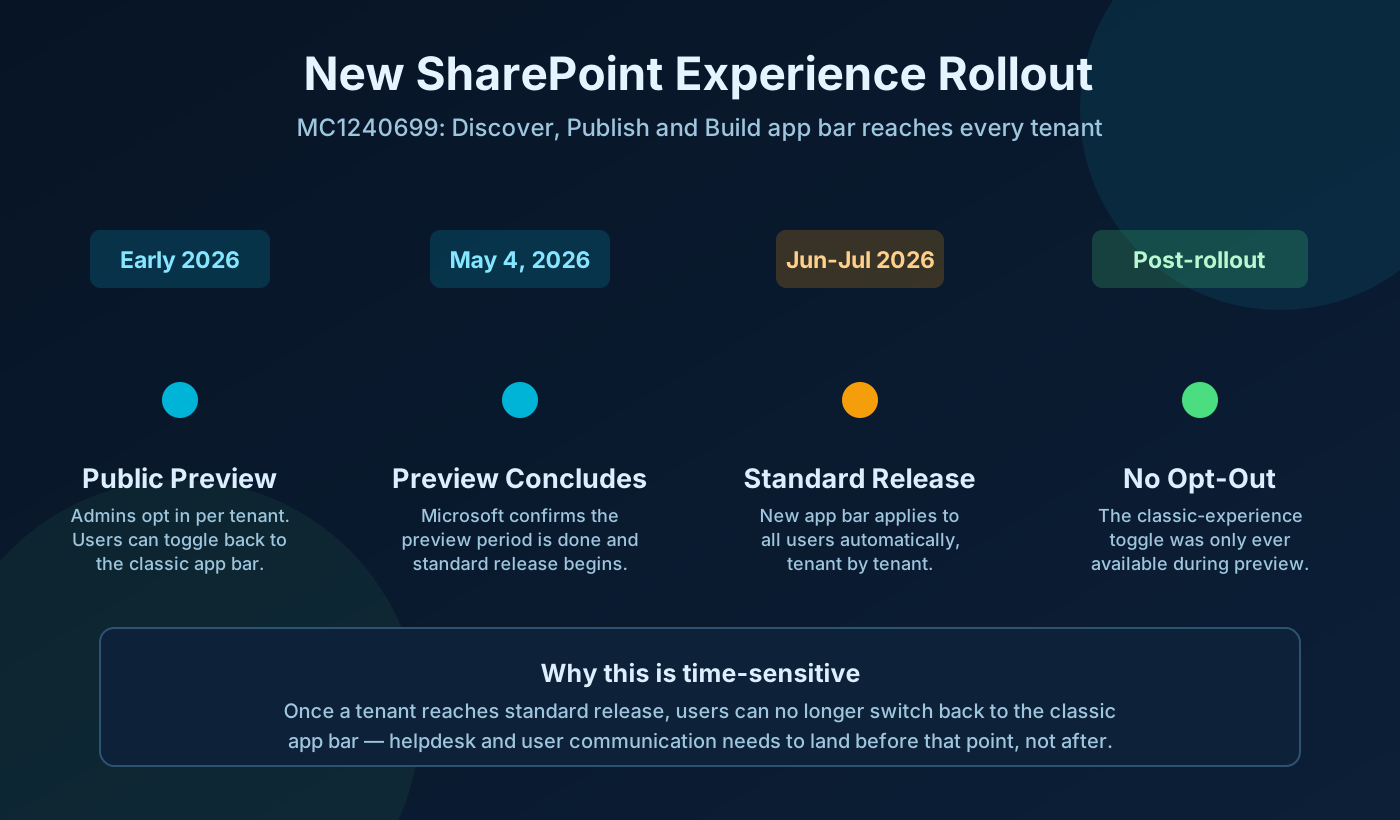
What makes this genuinely time-sensitive is one specific detail confirmed in Microsoft's own documentation: the option to switch back to the classic app bar existed only during the public preview, and that preview concluded on May 4, 2026. If your tenant has not yet reached standard release, you still have a short window to pilot the change, screenshot the new experience for your help desk, and catch anything that looks broken in custom branding. Once standard release reaches your tenant, that window closes.
SharePoint's navigation is being simplified around three jobs: finding things, publishing things, and building things. Instead of a general-purpose start page and a left-hand bar that tried to do everything, the new app bar routes each job to its own destination. Microsoft's stated goal is a "consistent, neutral palette" across SharePoint surfaces that pushes customer branding and content forward rather than competing with chrome and iconography for attention.
This is a UI and navigation change, not a permissions or content change. No site, list, library, or sharing setting is touched. What does change is what people click to get around, what your screenshots in training material look like, and — for anyone with custom SPFx web parts — how those web parts sit inside a lighter, more neutral surface.
Key clarification: "New SharePoint experience" describes navigation, the start page, and visual theming. It is not a rename of SharePoint, a migration, or a change to how permissions or sharing work.
The three new destinations map cleanly onto three different user intents, and understanding that split is the fastest way to explain the change to end users.
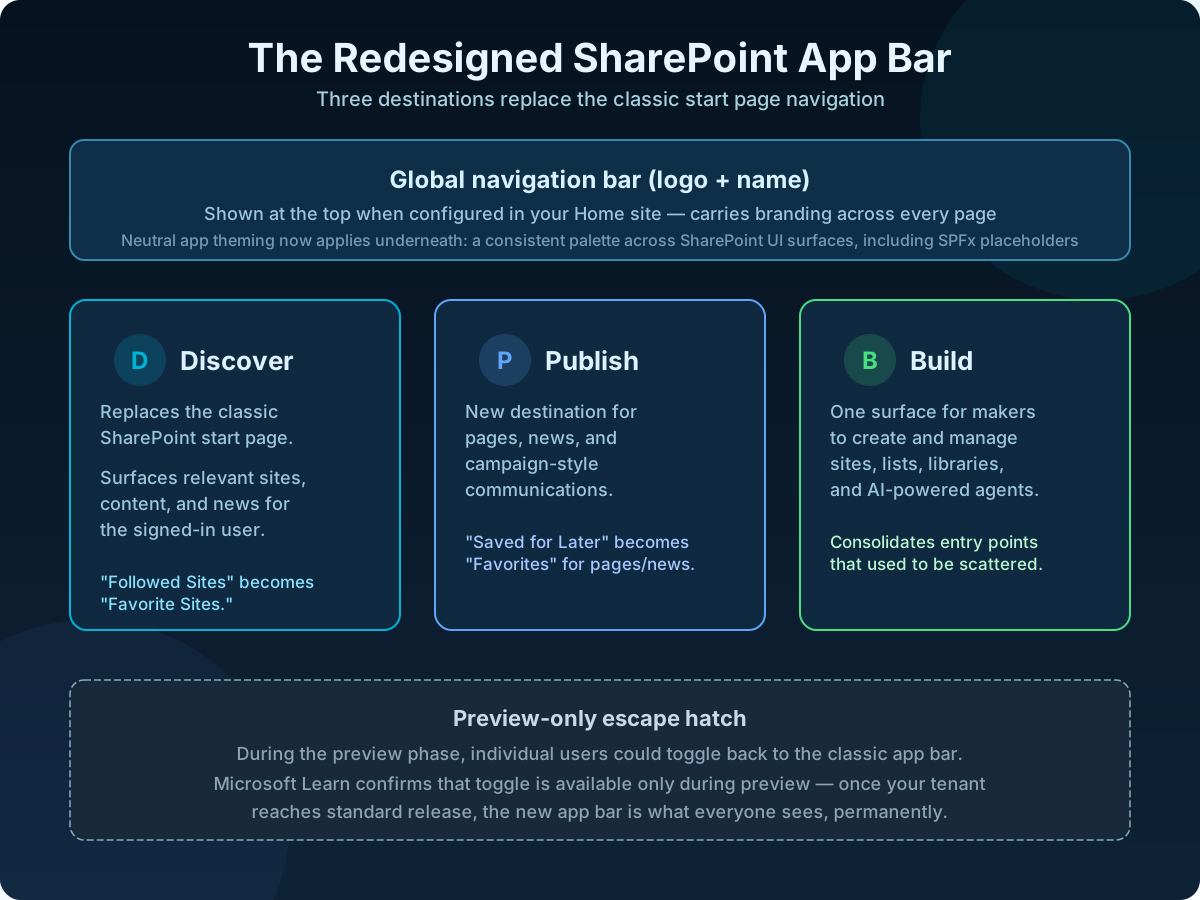
If your organization has configured global navigation on its Home site, the new app bar shows your logo and name at the top — this behavior is unchanged from the Viva Connections app bar model, just carried into the redesigned bar. Underneath all three destinations, neutral app theming applies a consistent, muted palette across SharePoint UI surfaces, including SPFx placeholders, so that your content and branding read more clearly against a quieter backdrop.
| Phase | What happened | Why it matters |
|---|---|---|
| Early 2026 | Microsoft opened public preview for the new SharePoint experience; admins could enable it per tenant. | Individual users could toggle back to the classic app bar during this window — your only chance to preview without commitment. |
| May 4, 2026 | Public preview concluded, per Microsoft's own documentation. | The classic-experience toggle stopped being offered as new tenants move through rollout. |
| June-July 2026 | Standard release carries the new experience to tenants that had not already enabled preview. | This is a Microsoft-driven, tenant-by-tenant rollout — you cannot indefinitely defer it by ignoring the admin setting. |
| Post-rollout | New app bar is the only experience available; no admin or user setting restores the classic bar. | Any readiness work (branding audit, help-desk training, communication) needs to land before your tenant reaches this point. |
Practical advice: do not treat "we haven't enabled it yet" as a long-term strategy. Standard release does not require you to opt in — it is Microsoft's default rollout path once preview closes for a given tenant wave.
If your tenant has not yet moved to standard release, you can still control the timing and run a pilot.
Governance tip: if the setting is no longer available to toggle at all, your tenant has already moved to standard release — skip straight to the post-rollout checklist below.
Because neutral theming changes background and surface colors rather than site content, the risk is cosmetic, not structural — but cosmetic problems on a heavily branded intranet still generate tickets.
| Area | What to check | Why |
|---|---|---|
| Custom SPFx web parts | Any web part with hard-coded background colors designed to match the old chrome | Neutral theming changes the surface underneath; hard-coded assumptions can clash |
| Home site global navigation | Whether logo and name are configured and render correctly at the top of the new app bar | This is carried forward from the existing Viva Connections app bar model — worth confirming, not assuming |
| Training material and screenshots | Any onboarding docs referencing "Followed Sites" or the classic start page | Labels change to Favorite Sites and Favorites; old screenshots will look wrong to new hires |
| Help-desk scripts | Whether support scripts describe navigation by old menu names | First-line support gets the "where did X go" tickets — give them the new map in advance |
This is a Microsoft-driven rollout, so your job is readiness and communication rather than a migration project.
| Symptom | Likely cause | Quick remediation |
|---|---|---|
| User asks "where did Followed Sites go?" | Rename to Favorite Sites, same underlying list | Point them to Discover > Favorite Sites; the sites they followed are still there |
| Custom web part background looks wrong or clashes | Hard-coded colors designed for the old chrome, now sitting on a neutral surface | Update the web part's styling to work with a neutral background, or remove hard-coded fills |
| Logo missing from the top of the app bar | Global navigation not configured on the Home site | Configure global navigation branding on your Home site per Microsoft's guidance |
| User still sees the classic app bar after rollout date | Phased rollout — tenants and even user sessions can update at slightly different times | Confirm via the admin center setting; if it shows active, ask the user to refresh or sign out and back in |
| Team asks to switch back to the old bar | Assumes the preview-era toggle still exists | Explain the toggle was preview-only and is not available post standard release |
Microsoft drives the rollout itself through standard release. Your actions are optional readiness work — piloting, auditing branding, and communicating — not a required migration step. If you do nothing, the new experience still arrives.
No. This change is limited to navigation, the start page, and visual theming. It does not touch SharePoint's underlying APIs, PnP PowerShell operations, Power Automate flows, or Graph calls against sites, lists, or libraries.
Track each client tenant's rollout phase separately using the admin center setting. Tenants that enabled preview early may already be past the toggle-back window; tenants that never opted in will hit standard release on Microsoft's timeline regardless of your involvement.
"Microsoft is redesigning how SharePoint's navigation looks and feels — not what's stored in it. Menus are reorganized around finding, publishing, and building content, and the overall look becomes cleaner and more neutral so our own branding stands out more. No files, permissions, or sites are affected."
Subject: SharePoint navigation is getting a refresh

Microsoft is rolling out a redesigned SharePoint navigation bar (MC1240699).

What changes:
- The start page becomes "Discover" for finding sites, content, and news.
- Two new areas appear: "Publish" (pages and news) and "Build" (creating sites,
  lists, and libraries).
- The overall look becomes cleaner with a neutral color theme.

What does NOT change:
- Your files, permissions, and site content are untouched.
- "Followed Sites" is now called "Favorite Sites" - the same sites are there.

Support:
If anything looks broken or you can't find something you used to see,
contact <support mailbox> with a screenshot.
Complete these six items and this becomes a smooth cosmetic update instead of a wave of "where did it go" tickets.
OceanCloud can pilot the new experience, audit your SPFx web parts and Home site branding against neutral theming, and produce a help-desk ready rollout runbook.
Book a Free Discovery Call →MC1240699 introduces a redesigned SharePoint app bar and start page.
The classic start page is replaced by a Discover experience, and the app bar gains two new destinations, Publish and Build, alongside a neutral visual theme applied across SharePoint surfaces including SPFx web part placeholders.
Only during the preview phase, and Microsoft's own documentation confirms public preview concluded on May 4, 2026.
The app bar's toggle back to the classic experience was available only during that preview window. Once a tenant reaches standard release, there is no admin or user setting left to restore the old app bar.
Neutral app theming applies a consistent, neutral palette across SharePoint UI surfaces, including SPFx placeholders, to keep content and branding visually forward.
Custom web parts that hard-coded colors matching the old chrome, or branding that depended on specific background tones, should be visually reviewed before rollout reaches your tenant.
No. This is a navigation, start-page, and visual theming change. It does not alter site permissions, content, sharing settings, or site structure.
Followed Sites is renamed Favorite Sites, and Saved for Later for pages and news is renamed Favorites, but the underlying data is preserved.
Enable the preview in a test tenant or pilot group first, screenshot the new Discover, Publish, and Build destinations for a help-desk runbook.
Also visually audit key SPFx web parts and Home site branding, and confirm whether global navigation is configured on your Home site so it appears correctly in the new app bar.
OceanCloud specialises in SharePoint consulting, M365 migration, Power Platform solutions, and enterprise governance. Let's discuss how we can help.
Book a Free 60-Minute Consultation ➜New SharePoint experience rollout checklist and help-desk one-pager.