Best SharePoint Integrations: Teams, Power BI & Salesforce
Connector options, integration patterns, and real-world outcomes for connecting SharePoint with Teams, Power BI, Salesforce, ServiceNow, and Dynamics 365.
Connector options, integration patterns, and real-world outcomes for connecting SharePoint with Teams, Power BI, Salesforce, ServiceNow, and Dynamics 365.
SharePoint works best not as a standalone document management system, but as the connective tissue between the tools your organisation runs on. Its native integrations with Microsoft Teams and Power BI are deep and built-in. Its integrations with Salesforce, ServiceNow, and Dynamics 365 are powerful but require planning. This guide covers all five — what each integration does, how to implement it, and the gotchas to avoid.
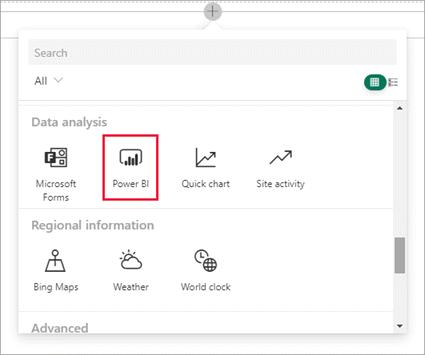
SharePoint and Teams are not separate systems that integrate — they are architecturally unified. Every Microsoft Teams team automatically creates a SharePoint team site. The Files tab in every Teams channel maps directly to a document library folder in that SharePoint site. When users upload files to Teams, they are storing them in SharePoint. When IT admins manage SharePoint permissions on the underlying site, those permissions affect what Teams members can access in Files.
📄 Teams-connected sites in SharePoint — learn.microsoft.comThe SharePoint-Power BI integration works in both directions: Power BI can use SharePoint lists as a data source to build reports, and Power BI reports can be embedded directly into SharePoint pages.
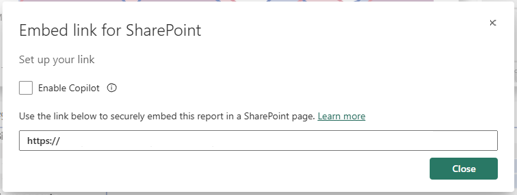
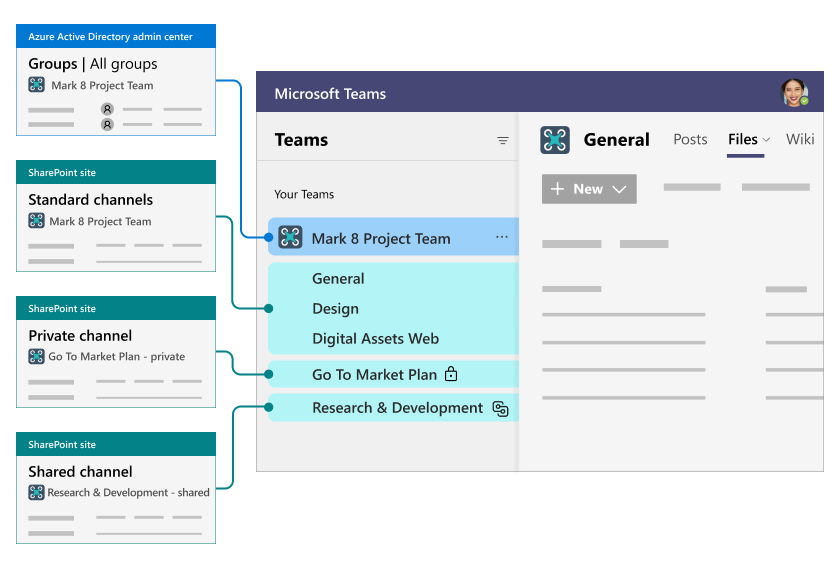
The Power BI web part lets you embed any published Power BI report or dashboard directly into a SharePoint page. The embedded report respects Power BI Row-Level Security (RLS) — each viewer sees only the data they have permission to see in Power BI, regardless of what SharePoint permissions they have. Implementation:
Power BI Desktop's SharePoint Online List connector lets you import or directquery SharePoint list data for reporting. Useful for tracking approval volumes, project status distributions, contract expiry timelines, and other structured data that lives in SharePoint lists. Limitations: the SharePoint List connector is not the most performant for large lists (over 5,000 items); for high-volume data, consider syncing SharePoint list data to Dataverse or Azure SQL and querying that instead.
Salesforce is the system of record for customer relationships; SharePoint is the document and collaboration platform. The gap between them — sales teams emailing documents outside Salesforce, contracts stored locally, proposals not linked to CRM records — is where value is lost. Integration closes that gap.
| Pattern | Implementation | Best for |
|---|---|---|
| Documents linked to Salesforce records | Power Automate: when Salesforce opportunity reaches a stage, auto-create a SharePoint site/folder and link the URL back to the CRM record as a custom field | Sales teams who need all deal documents (proposals, contracts, SOWs) organised by opportunity |
| Contract approval in SharePoint → Salesforce update | Power Automate: when SharePoint document is approved, update Salesforce opportunity status and attach the document reference | Legal/sales handoffs; ensuring CRM reflects actual contract status |
| Salesforce data in SharePoint pages | Custom SharePoint web part or Power Apps embedded in SharePoint pulls CRM data via Salesforce connector | Account management pages showing live CRM data alongside SharePoint documents |
| Bidirectional sync | Azure Logic Apps with Salesforce and SharePoint connectors for enterprise-grade sync with error handling and retry | Large organisations needing reliable, high-volume data synchronisation |
ServiceNow is the dominant ITSM platform for enterprise IT service management. SharePoint integration adds document management, knowledge base access, and collaboration capabilities that ServiceNow lacks natively.
Dynamics 365 has native SharePoint document management built in. When enabled, each Dynamics 365 record (Account, Opportunity, Case, etc.) gets a corresponding SharePoint folder. Documents attached to that record in Dynamics are actually stored in SharePoint — giving users the full SharePoint experience (version history, co-authoring, search, retention) while working within Dynamics 365.
📄 Set up SharePoint integration for Dynamics 365 and customer engagement apps — learn.microsoft.comThe native integration covers document storage. For richer scenarios — automated document generation from Dynamics templates, approval workflows that span Dynamics and SharePoint, or reporting across both systems — Power Automate and Power BI are the connective tools. The Dynamics 365 connector in Power Automate provides access to all standard Dynamics entities for reads, creates, updates, and deletes without custom code.
| Requirement | Recommended approach |
|---|---|
| Simple, event-based triggers (when X happens in system A, do Y in system B) | Power Automate cloud flow with standard or premium connectors |
| High-volume, reliable bidirectional sync with retry and error handling | Azure Logic Apps |
| Real-time data from external system displayed in SharePoint UI | Power Apps canvas app embedded in SharePoint page |
| Native document management for Dynamics 365 | Dynamics 365 built-in SharePoint document management |
| Complex transformation or on-premises connectivity | Azure Logic Apps with on-premises data gateway |
OceanCloud designs and builds SharePoint integrations with Salesforce, ServiceNow, Dynamics 365, and any other system with an API — from simple Power Automate flows to enterprise Azure Logic Apps with full error handling and monitoring.
Discuss Your IntegrationThe four main integration approaches are: Power Automate for no-code event-driven flows, Microsoft Graph API for programmatic read/write access, SharePoint webhooks for real-time change notifications to external systems, and embedded web parts or iFrames for surfacing external app content inside SharePoint pages.
Yes. Power Automate has certified connectors for both Salesforce and Dynamics 365.
You can sync records between SharePoint lists and CRM, trigger document creation in SharePoint from CRM events, or attach SharePoint documents to CRM records. Microsoft Dynamics 365 also has native SharePoint document management integration built in.
Microsoft Graph is the unified API endpoint for all Microsoft 365 services.
For SharePoint, it exposes sites, lists, drives (document libraries), pages, permissions, and search. Any integration that needs to read or write SharePoint data programmatically — from a web app, Azure Function, or external system — goes through Graph.
Not always. Power Automate integrations run entirely within Microsoft 365 with no Azure dependency.
Microsoft Graph API calls can be made from any platform using app registrations in Microsoft Entra ID. Azure is only required for hosting custom code such as Azure Functions, Logic Apps, or Azure API Management.
Use Power Automate with the 'When an item is created or modified' SharePoint trigger to push changes to an external system via an HTTP action or connector.
For two-way sync, pair this with a scheduled flow (Recurrence trigger) that polls the external system and updates SharePoint. For high-volume scenarios, use Azure Logic Apps with retry policies and dead-letter queuing.
OceanCloud specialises in SharePoint consulting, M365 migration, Power Platform solutions, and enterprise governance. Let's discuss how we can help.
Book a Free 60-Minute Consultation ➜